Your Shopify store is getting traffic, but the sales aren’t following. You’re spending on ads, posting on social, maybe even running promotions, and yet your revenue stays flat. If that sounds familiar, the problem isn’t your marketing. It’s what happens after the click.
Most ecommerce brands lose customers silently: slow pages, confusing navigation, surprise fees at checkout, and a dozen other friction points that quietly push shoppers away before they buy. The good news? These issues are fixable, and fixing them doesn’t require more ad spend. It requires a sharper look at your store.
This Shopify conversion rate optimization checklist walks you through the highest-impact areas where revenue leaks happen, backed by real data, so you know exactly where to focus.
Why Conversion Rate Optimization Matters More Than Traffic
Before diving in, here’s the number that should make every Shopify merchant stop and think: according to Baymard Institute, the average cart abandonment rate across ecommerce sits at 70.19%. That means 7 out of every 10 shoppers who show enough intent to add a product to their cart leave without buying.
And the global average ecommerce conversion rate? Research from OptiMonk analyzing over 18,000 ecommerce websites puts it at just 1.81%. For context, top-performing Shopify stores consistently hit 3% to 5%.
The gap between average and top-performing stores isn’t explained by better products or bigger ad budgets. It’s explained by the quality of the store experience. That’s what Shopify CRO is built to close.
1. Page Speed: The Silent Conversion Killer
Speed is the first thing visitors judge, even before they read a word of your copy. Speed Commerce data shows that even a one-second delay in load time can cause a measurable drop in conversions, and on mobile, the damage is worse.
Mobile accounts for the majority of ecommerce traffic, yet desktop still converts higher, largely because mobile experiences are slower and harder to navigate. If your Shopify theme is loaded with heavy apps, unoptimized images, or unnecessary scripts, you’re actively losing sales on every page load.
Quick fixes here include:
- Compressing images to WebP format without sacrificing quality
- Removing or replacing unused Shopify apps that inject scripts into your storefront
- Switching to a faster Shopify theme built for performance
Run your store through Google PageSpeed Insights and treat the score like a revenue metric, because it is.
2. Product Pages: Where Purchase Decisions Are Won or Lost
Your product page is your most important sales asset. It needs to do the job of a salesperson: answer objections, build trust, and make the next step obvious.
Weak product pages share common patterns. Generic descriptions that only list features without explaining benefits. Low-quality photos that don’t show the product in context. No social proof above the fold. A call-to-action button that blends into the page.
Data from PowerReviews shows that adding reviews to a product page can lift conversions significantly, as shoppers actively look for validation before purchasing. A page with zero reviews converts at a fraction of what a page with even five reviews does.
Strong product pages do the following:
- Lead with a benefit-driven headline, not just the product name
- Show multiple images including lifestyle shots and close-ups
- Place trust signals (reviews, guarantees, secure badges) near the Add to Cart button
- Use clear, scannable descriptions that answer the “why should I buy this” question fast
This is one of the highest-leverage areas in any ecommerce conversion rate optimization effort.
Stop guessing what’s hurting your conversions. Get a clear list of exactly what to fix in minutes.
3. Checkout: Where Revenue Goes to Die
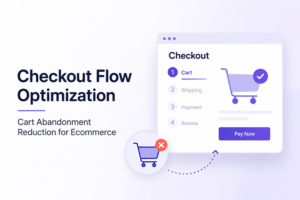
The checkout is where most stores bleed the most money. Baymard Institute’s large-scale research found that the average large ecommerce site can achieve a 35% increase in conversion rate through better checkout design alone. That’s not a marginal improvement. That’s transformational.
The most common checkout killers:
- Surprise costs. Unexpected shipping fees or taxes at checkout cause 48% of cart abandonments, per Baymard’s 2024 data.
- Forced account creation. Roughly 24-26% of shoppers abandon when forced to create an account. Guest checkout is not optional.
- Too many form fields. The average checkout flow contains 11.3 form elements. Reducing this number reduces friction and lifts completions.
- Limited payment options. In 2026, shoppers expect digital wallets like Apple Pay, Google Pay, and Shop Pay. Missing these means missing sales.
Every unnecessary step between “Add to Cart” and “Order Confirmed” costs you money. Treat your checkout like a conversion funnel and audit every field, every screen, and every point where a shopper might hesitate.
4. Cart Abandonment Recovery: The Revenue You’ve Already Earned
Cart abandonment recovery is one of the fastest ways to increase revenue without acquiring a single new customer. You’ve already paid for that traffic. You’ve already earned that intent. The shopper just didn’t finish.
According to Moosend research, 40 to 45% of abandoned cart emails are opened, and 50% of users who clicked through those emails completed a purchase. Klaviyo data puts the revenue per abandoned cart email at $5.81.
But email alone isn’t enough in 2026. AI-powered recovery systems that detect abandonment behavior in real time and trigger personalized recovery sequences can recover 30 to 38% of abandoned sessions, compared to 3 to 5% for standard email flows. That’s the difference between watching revenue walk out the door and catching it before it leaves.
Eulav’s intelligent recovery engine is built exactly for this. It detects cart abandonment behavior in real time and activates recovery sequences automatically, so you’re not losing revenue to abandoned sessions you never even knew about.
5. Trust Signals: The Invisible Barrier Between Browsers and Buyers
Shoppers are cautious, especially with brands they haven’t bought from before. Trust signals are the cues that lower that caution and make completing a purchase feel safe.
These include security badges, clear return policies, verified customer reviews, money-back guarantees, and visible contact information. Stores that bury their return policy or hide their customer service options make shoppers nervous. Nervous shoppers don’t buy.
See what Revvy finds in your own store, no card required.
An easy audit: go through your store as a first-time visitor. Ask yourself at every stage, “Do I trust this store enough to hand over my payment details?” If there’s any hesitation, that’s a conversion leak.
For deeper guidance on monetizing your existing traffic through better trust architecture, that’s a good resource to review.
6. Mobile Experience: Non-Negotiable in 2026
Mobile represents the majority of Shopify traffic for most stores. Yet mobile conversion rates consistently lag behind desktop because most stores were optimized for desktop first and mobile as an afterthought.
Mobile CRO isn’t just about responsive design. It’s about thumb-friendly navigation, fast tap targets, simplified forms, and a checkout that doesn’t require zooming or excessive scrolling. Test your store on an actual phone, not just a browser preview.
If your mobile conversion rate is significantly below your desktop rate, that gap is a revenue opportunity. Closing it requires treating mobile as a first-class experience, not a scaled-down version of your desktop store.
Read more about the connection between ecommerce revenue leakage and mobile underperformance in the Eulav insights library.
7. Navigation and Site Search: Are Shoppers Finding What They Want?
If shoppers can’t find products, they can’t buy them. Poor navigation and broken or weak site search cause silent drop-offs that look like traffic problems but are actually UX problems.
Best practices here are straightforward. Keep your main navigation focused on your top categories. Make your search bar prominent and ensure it handles misspellings and synonyms. Add filters to category pages so shoppers can narrow down by size, price, color, or other relevant attributes without scrolling endlessly.
Stores that improve their Shopify conversion optimization often find that navigation changes alone produce measurable lifts in both session depth and purchase rate.
Stop Auditing Manually. Let AI Do It.
This checklist covers the main areas, but manually reviewing every product page, checkout step, and trust signal across a growing catalog is time-consuming and easy to get wrong. Small issues compound. A five-second load time on one high-traffic page, a missing trust badge on another, a surprise fee at checkout on your best-selling product, and collectively they represent thousands in monthly lost revenue.
Audit your store now. Find and fix your revenue leaks in minutes.
FAQs: Shopify Ecommerce Sites: A Practical Conversion Rate Optimization Checklist
Most Shopify stores convert between 1.5% and 3%. Stores achieving 3% to 5% are considered high performers. If your rate is below 1.5%, there are likely significant UX or trust issues worth addressing through a structured CRO process.
The most effective fixes are removing surprise fees at checkout, enabling guest checkout, reducing the number of checkout steps, and adding real-time cart recovery sequences. Baymard Institute data shows better checkout design alone can lift conversions by up to 35%.
Common causes include slow page load times, weak product page copy, missing trust signals, a complicated checkout process, limited payment options, and poor mobile experience. A structured store audit identifies which of these is most affecting your specific store.
AI-powered tools like Eulav analyze your store’s behavior data in real time, identify friction points that suppress conversions, and can trigger automated recovery sequences for abandoned carts. This goes far beyond manual auditing in speed and accuracy.
At minimum, quarterly. But for fast-growing stores or after major changes to your theme, apps, or product catalog, a more frequent audit cycle catches issues before they compound into significant revenue loss.