Shopify checkout optimization matters more than almost any other page on your store, visitors here have already decided to buy, so friction is the most expensive kind.
Checkout is the last and highest-stakes step in the funnel, visitors here have already decided to buy, so friction at this stage is the most expensive kind. Here’s what actually affects Shopify checkout conversion.
Shopify checkout optimization: payment options
Shop Pay, Apple Pay, and Google Pay reduce checkout time meaningfully, especially on mobile where manually entering card details is the single highest-friction moment in the flow. Baymard’s research consistently ranks payment-related friction among the top documented causes of checkout abandonment.
Form design
Every field you ask for is a small tax on completion. Audit your checkout form for fields you’re not actually using. A surprising number of stores collect data at checkout that never gets used downstream.
Trust signals at the right moment
Security badges and clear return policy language matter most right before someone enters payment details, not on the homepage where the decision to trust you should already be settled. Place them near the payment fields specifically.
Mobile checkout specifics
Numeric fields should trigger a numeric keyboard. Buttons need real tap-target size, not desktop-scale hit areas shrunk down. Test your actual checkout flow on a real phone, on a throttled connection. Not just in a desktop browser resized smaller.
Progress and clarity
If checkout spans more than one page, show a progress indicator. Uncertainty about how many steps remain is itself a source of abandonment, independent of how long the process actually takes.
Keeping this optimized over time
Checkout friction isn’t static, new payment methods emerge, mobile OS behavior changes, and your own catalog shifts. Revvy monitors checkout continuously and ships fixes as new friction appears, instead of requiring a fresh manual review every few months.
Revisit this after every major store change.
Prioritize based on your own funnel data, not a generic checklist alone.
Every fraction of a percent recovered here compounds across your total order volume.
Small, well-tested checkout changes shipped consistently outperform one large redesign shipped once.
Checkout deserves the same ongoing attention as any other high-traffic, high-value page on your store.
Treat any checkout vendor or app change as a small migration in its own right, test thoroughly on a duplicate setup before replacing a working checkout flow with an unproven one.
Small, incremental checkout improvements compound meaningfully over a year, even when no single change feels dramatic in isolation. Track cumulative checkout completion rate over quarters, not just after each individual change, to see the real trend beneath the noise of any single test.
Checkout will never be fully “finished”, new payment methods emerge, customer expectations shift, and your own catalog changes. Treat it as a page that gets periodic attention indefinitely, not a project with a defined end date.
Coordinating checkout changes with your support team
Before shipping a significant checkout change, brief your customer support team on what’s different. This prevents a spike in confused support tickets from being misread as a conversion problem when it’s actually just a temporary adjustment period as returning customers notice the change.
Prioritizing checkout fixes by effort
Payment method additions and cost transparency fixes are typically configuration changes achievable within days. Deeper checkout redesigns or extensibility customizations take longer and carry more risk. Start with the fast, low-risk wins before committing to a larger checkout overhaul.
Checkout abandonment recovery specific to Shopify’s native tools
Shopify’s built-in abandoned checkout recovery emails are a reasonable baseline, but third-party recovery apps often offer more sophisticated segmentation (recovering high-value carts differently than low-value ones), worth evaluating whether the native tool is sufficient for your store’s cart value distribution before adding another app.
Accessibility considerations at checkout
Checkout forms with poor contrast, small tap targets, or unclear error messaging create friction for visitors using assistive technology or simply navigating quickly on a small screen, accessibility improvements here often improve usability broadly, not just for the subset of visitors using screen readers specifically.
One-page vs. multi-page checkout
Shopify’s default checkout uses a streamlined flow, but some apps allow further consolidation into a single page. Evidence on which performs better varies by store and audience. The honest answer is to test on your own traffic rather than assuming one structure universally outperforms the other.
Post-purchase upsells and their conversion implications
Post-purchase upsell offers (shown after the initial order completes but before the confirmation page) can increase average order value without adding pre-purchase checkout friction, since they appear after the primary conversion has already happened, worth considering as a separate lever from checkout simplification itself.
See what Revvy finds in your own store, no card required.
Testing checkout changes without breaking compliance
Checkout is subject to more regulatory and payment-processor requirements than other pages, certain fields (billing address, terms acceptance) usually can’t be removed for compliance reasons even if they add friction. Confirm any field-reduction changes with your payment processor’s requirements before removing something that turns out to be mandatory.
International checkout considerations
If you sell internationally, checkout friction compounds, currency display, region-specific payment methods, and customs/duty transparency all matter more for cross-border orders than domestic ones. A checkout optimized only for your primary market can quietly underperform for international traffic.
Common questions about Shopify checkout optimization
Can I fully customize Shopify’s checkout?
Customization depth depends on your Shopify plan, checkout extensibility is more flexible on higher-tier plans than on Basic.
Should I A/B test checkout changes?
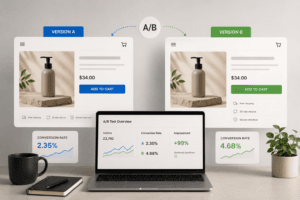
Where possible, yes, checkout is high-stakes enough that even well-intentioned changes can occasionally reduce conversion, so testing before a full rollout reduces risk.
How much does checkout speed actually matter?
Significantly, especially on mobile. Every additional second of load time at this stage, where intent is already high, has an outsized impact on completion.
Ongoing shopify checkout optimization, done consistently, outperforms a single large redesign.
Related reading
- The Ecommerce CRO Checklist: Product Page to Checkout
- Shopify A/B Testing: Tools and How to Run One Properly
- Post-Purchase Upsells: How to Increase AOV Without Hurting Conversion
Let Revvy monitor checkout continuously.
Finds and fixes checkout friction as it appears. $12 free capacity, no card.